


AT&T ActiveArmor®
4.228.01K Reviews
App Specs
- Version
- 8.0-3c955b7
- Updated On
- License
- Free
- Downloads
- 50,000,000+
- Developer
- AT&T Services, Inc.
- Categories
- Tools
- Platform
- Android, iOS
Screenshots
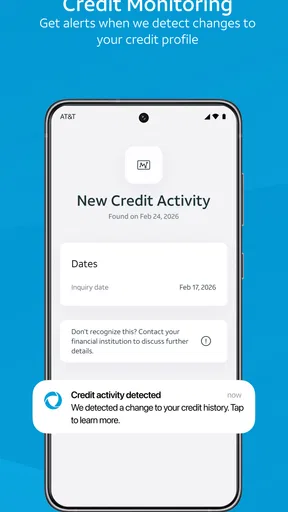
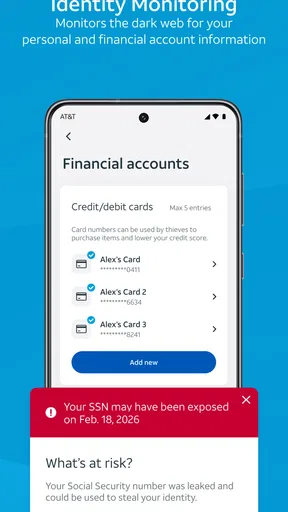
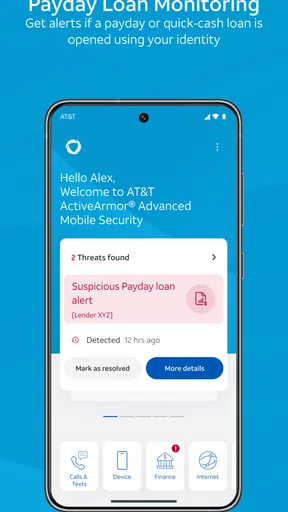
 Analysis by AppCompare
I think a phone-security app earns trust less through bold promises than through clear choices: what it asks me to enable, what it alerts me about, and whether I can understand its role in everyday use. AT&T ActiveArmor® is AT&T Services, Inc.’s free security tool, aimed especially at people who want help dealing with unwanted calls and common mobile risks without managing a complicated security suite. I’d approach it as a useful layer of assistance, not a guarantee that every threat will be caught.
Who will get the most from it
The clearest fit is someone who receives frequent suspected spam calls, uses a phone for everyday browsing and messaging, and would rather have a central place to review security options than assemble several separate tools. It may also suit a less technical family member who benefits from straightforward alerts and settings, provided they are comfortable using an AT&T service and checking what the app asks them to enable.
If you mainly want antivirus scanning, detailed device diagnostics, or a security product that works independently of a carrier relationship, compare alternatives before settling on this one. ActiveArmor’s appeal is its mobile-protection focus and familiar call-related use case; it is not a reason to assume that every kind of device security is covered. I would not install it just because the word “security” appears in its description. I’d first decide which problem I actually want it to help with.
A practical way to judge the controls
On first setup, I’d take a moment to review each prompt rather than tapping through quickly. A security app can only provide certain protections when the relevant access or setting is enabled, and the choice should make sense for the feature being used. If a request appears, I’d ask myself what it enables and whether I want that function before granting it. That small pause is more useful than switching on every option by default.
Then I’d check the dashboard again after setup and make sure I can tell what is active. A status screen is most helpful when it reflects choices I understand, not when it simply looks reassuring. If a feature is optional, I’d leave it off until I know I need it; if I turn it on, I’d keep track of where to revisit the setting. This is a practical habit with any protection app, particularly one that brings several different kinds of security tools together.
Calls, connections, and personal information
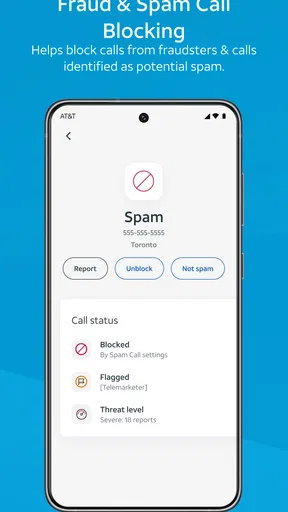
Call protection is easy to evaluate in daily life: notice whether suspected spam is identified, and use the app’s controls thoughtfully when a call matters. A warning should prompt a closer look, not an automatic assumption that every unfamiliar number is dangerous. I’d be especially careful with calls about banking, deliveries, or account problems. If a caller asks for sensitive information, I would end the call and contact the organization through a channel I already trust rather than relying on caller identification alone.
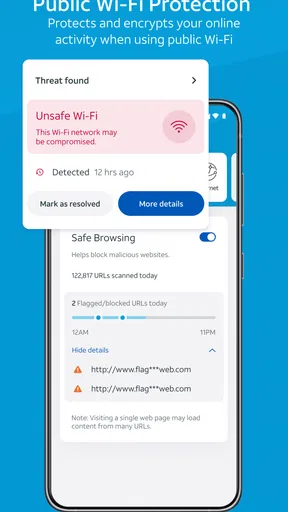
Network and identity-related tools call for a different kind of attention. A Wi-Fi security warning can be a reason to reconsider a connection, but it cannot replace sound judgement about what I do on a public network. Likewise, an identity alert is a prompt to investigate and take appropriate steps; it does not itself undo exposure or secure every account. I find it useful to think of these features as signals that help me respond, rather than as substitutes for strong passwords, careful account recovery settings, and checking important accounts directly.
Worth Reading Before You Choose

EA SPORTS FC Mobile 26 Is a Bigger Football Game, but It Takes Time

Flipboard Shows What News Apps Must Do Beyond the Feed

Switching to Android Auto Means Rethinking Your Driving Routine

Google Calendar Makes a Crowded Week Easier to Manage

Ludo King Makes the Most of the Minutes Between Plans

Baby Panda World Brings Quick Play to Modern Phones, but Its Game Library Feels Busy
What to compare before choosing
The usual alternatives fall into a few groups: the phone’s built-in security and call controls, standalone security apps, and carrier-linked tools. Built-in settings may be enough if my main concern is basic device hygiene and I rarely get nuisance calls. A dedicated security app may be a better match if I want a broader set of device-focused controls or prefer a provider unrelated to my mobile carrier. ActiveArmor makes more sense when its call and mobile-security functions line up with the problem I actually face.
I’d also compare the ongoing experience, not just the feature names. Do I want alerts in a separate security app? Am I comfortable reviewing settings in a carrier-associated tool? Will I act on warnings, or will they become notifications I ignore? A service that is theoretically more comprehensive is not automatically better for me if its alerts are hard to interpret or its settings do not fit my habits. The best choice is the one whose controls I understand and will realistically maintain.
What Is AT&T ActiveArmor®?
Alright, let’s break it down. AT&T ActiveArmor® is essentially a mobile security app designed to protect your device from a slew of online threats. Think of it as your phone’s personal bodyguard, ready to fend off unwanted invaders and keep your data safe and sound. It’s available for both Android and iOS, so no one’s left out in the cold here.
Getting Started with AT&T ActiveArmor®
First things first, downloading and setting up the app is a breeze. Head over to your app store, type in AT&T ActiveArmor®, and you’re good to go. The interface is pretty intuitive, which is something I really appreciate. No one has time for complicated setups, right?
Once you’re in, you’ll notice the app offers a clean and organized dashboard. Everything you need is just a tap away. From here, you can manage your security settings, check your protection status, and dive into a few more features which we’ll chat about in a bit.
Top Features to Explore
There’s a lot to love about AT&T ActiveArmor®, but let me highlight some of the features that really stood out to me:
- Call Protection: This feature is a lifesaver if you’re tired of those annoying robocalls. The app identifies and blocks potential spam calls, which is a huge plus.
- Network Security: ActiveArmor® keeps an eye on your Wi-Fi connections to ensure you’re not connecting to anything sketchy. It’s like having a digital watchdog.
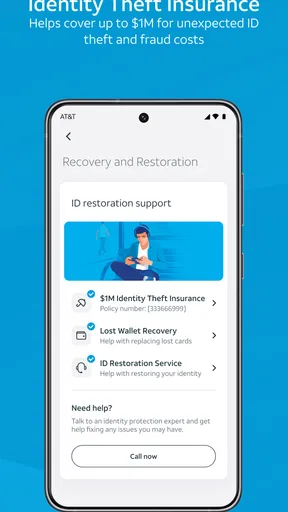
- Identity Monitoring: This is your go-to for keeping tabs on your personal info. If your data is ever compromised, you’ll get an alert straight away.
Performance and User Experience
Now, let’s talk about how it actually performs. The app runs smoothly without eating up a ton of battery life, which is crucial. I’ve had experiences in the past where security apps slow everything down, but that’s not the case here.
The notifications are timely and not at all intrusive. You’ll get alerts when necessary, but it doesn’t bombard you with constant pings, which I find super refreshing. It’s all about balance, and AT&T ActiveArmor® seems to nail it.
Everyday use without switching off your judgement
Picture a weekday when I’m expecting a delivery, but my phone also rings with an unfamiliar number while I’m in the middle of work. A call-protection label can help me decide whether to pause and inspect the call, but I wouldn’t treat it as proof of who is calling. If the call claims there is a problem with an order or account, I’d open the relevant app or contact the company through a known route. The app is most useful in that moment as a nudge to slow down, not as a replacement for checking the story.
For Wi-Fi, I’d use a similar routine. Before doing something sensitive on a network I do not know well, I’d pay attention to any warning and consider switching to a connection I trust. Even when no alert appears, I’d avoid assuming that every public hotspot is appropriate for every task. This is a small but important trade-off: security tools can help flag concerns, while the user still has to decide whether the connection and the activity make sense together.
Keeping notifications useful rather than noisy
When an app protects several parts of mobile use, alerts are only valuable if I can distinguish an action item from background reassurance. I’d read the wording of a warning before responding, then use the dashboard to check what it refers to instead of tapping a notification reflexively. If an alert seems unclear, I would avoid sharing credentials or personal details while I investigate. That approach makes the app’s signals more useful and reduces the chance of treating an unexpected prompt as trustworthy simply because it appears inside a security tool.
I’d also revisit settings after changing phones or adjusting call and network preferences. A new device setup is a good time to confirm that the protections I care about are still enabled and that I recognize the choices on screen. This is not a complicated maintenance routine; it is a quick check that prevents me from assuming an old configuration followed me unchanged. It is particularly worthwhile for someone who relies on call filtering but occasionally needs to hear from new clients, schools, clinics, or delivery services.
Limits worth keeping in mind
No call filter will know the context behind every legitimate or unwanted call. An unfamiliar number may be important, while a call that looks ordinary can still deserve caution. I’d use any blocking controls carefully if I’m job hunting, managing appointments, or waiting for a call from someone whose number I do not have saved. In those situations, reviewing a warning or allowing a call through may be more sensible than blocking broadly and hoping to notice a missed contact later.
There is also a difference between monitoring for a problem and fixing it. An identity-related alert can tell me to pay attention, but I still need to secure the affected account, change credentials where appropriate, and follow the account provider’s own recovery steps. Network checks are similarly one part of a safer routine, not a promise that every risky link or online trick will be detected. I would keep the app in its proper role: an extra source of guidance, alongside careful habits and the security settings of the phone and the services I use.
Availability, cost, and fit
ActiveArmor is a free Tools app from AT&T Services, Inc., with optional in-app purchases listed from $3.99 to $7.00 per item. It has a 4.4 average from around 85 thousand ratings, and it has passed 10 million installs. Those figures suggest that many people have tried it, but popularity alone would not decide the matter for me. I’d look at whether its controls suit my needs and review any purchase choice before confirming it.
The app is rated for Everyone, and its current version is 7.6.1-b8be8cb. It was released on July 25, 2017, and the stated minimum operating-system requirement is 10. Before installing, I’d check that my device meets that requirement and that I’m choosing the right app for my phone. If I do not want a carrier-linked tool, or if I need a different kind of security product, I’d compare other options rather than treating this as a universal answer.
Why Consider AT&T ActiveArmor®?
So, why would you want to consider this app? Well, if you’re like me and a bit paranoid about online security, it’s a no-brainer. The peace of mind knowing that your personal data and device are under solid protection is honestly priceless.
Moreover, the app’s ability to adapt and update its defenses against new threats is impressive. In a world where digital threats are constantly evolving, having a security app that keeps up is essential.
Final Thoughts
All in all, AT&T ActiveArmor® is a robust, user-friendly app that’s well worth checking out if you’re in the market for a reliable security solution. It covers all the bases without complicating things, making it a great choice for anyone, tech-savvy or not.
Give it a shot and see how it fits into your digital life. You might just find it’s the kind of protection you’ve been looking for. Stay safe out there, friends!
Pros
- Enhanced security features for device protection.
- Real-time alerts for potential threats.
- Easy-to-use interface for all users.
- Customizable security settings.
- Free basic features with premium options.
Cons
- Limited features without premium subscription.
- Can impact device performance slightly.
- Notifications can be frequent and intrusive.
- Requires constant updates for new threats.
- Not all features available on all devices.
FAQs for AT&T ActiveArmor®
What is AT&T ActiveArmor® and how does it enhance my device's security?
AT&T ActiveArmor® is a comprehensive security app designed to protect your device from cyber threats. It offers features such as secure Wi-Fi protection, identity monitoring, and call protection. By utilizing advanced security algorithms, it helps safeguard your personal information and provides alerts about potential security threats to enhance your overall device security.
Is AT&T ActiveArmor® free to use, or are there any subscription fees involved?
AT&T ActiveArmor® offers both free and premium versions. The free version includes essential security features like call protection and secure browsing. However, for more advanced protection such as identity monitoring and advanced threat alerts, you may need to subscribe to the premium plan, which involves a monthly subscription fee.
How do I install AT&T ActiveArmor® on my device, and is it compatible with both Android and iOS?
To install AT&T ActiveArmor®, visit the Google Play Store for Android devices or the Apple App Store for iOS devices. Search for "AT&T ActiveArmor®" and follow the installation instructions. The app is compatible with most modern Android and iOS devices, ensuring a wide range of users can benefit from its security features.
Can AT&T ActiveArmor® protect my device from phishing attacks and malware?
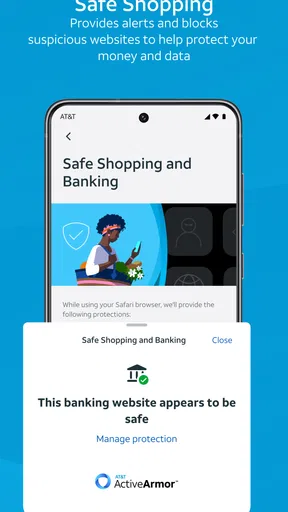
Yes, AT&T ActiveArmor® is equipped with tools to detect and block phishing attempts and malware. It provides real-time alerts and blocks suspicious websites to prevent you from falling victim to scams. The app continuously updates its threat database to ensure it can protect against the latest cyber threats effectively.
Does AT&T ActiveArmor® affect the performance of my device or battery life?
AT&T ActiveArmor® is designed to run efficiently in the background without significantly affecting your device's performance or battery life. The app optimizes resource usage to ensure minimal impact on your device while providing robust security features. Users typically experience no noticeable slowdown or battery drainage.


